
HyperFluxCMS
Fast. Flexible. Free.


HyperFluxCMS
Logging in
Loggin in to your site to start configuration
To perform any operation on your site, such as changing settings and publishing posts, you need to log in. See how to do it.
To publish posts on your site, upload images, edit publications, change settings, and manage users, you first need to access the login page, which will take you to the configuration page.
For security reasons, there is usually no direct link to the login, settings, and management pages on published pages (although you can include one if you want, but it is not recommended).
To log in and start managing your site, you will need to access the link:
https://<your-site-name>/hfc-admin/login
Obviously, you must replace <your-site-name> with your site's name.
Then the login page will open.
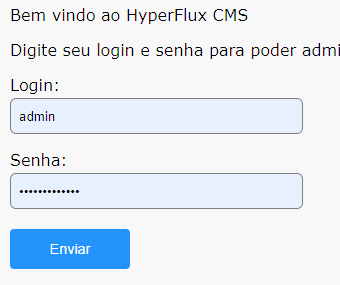
In "login" use "admin" and in "password", use the code/password generated right after installing HyperFluxCMS. Click Submit and if everything is correct, you will see the site configuration and management page.
Let's start with the most basic step: configuring the site.